GST engine and GSP roadmap

GST built into every invoice, and a clear path to the portal.

From section 22 turnover exemptions to CGST, SGST and IGST splits, Deku prepares GSTR-1 and GSTR-3B as offline JSON for you to upload. Direct filing, e-invoices and e-way bills go through a GST Suvidha Provider; that connection is built, but none is connected yet.

Done in Deku

Available
  • Tax invoices and bills of supply
  • CGST and SGST, or IGST, from the place of supply
  • Input tax credit marked eligible, blocked or ineligible
  • GSTR-1 and GSTR-3B summaries with offline JSON

Needs a GST Suvidha Provider

Not connected
  • Filing returns directly on the portal
  • E-invoice IRN and signed QR
  • E-way bills

Statutory thresholds

Section 22 of the CGST Act: know when to register

Below the turnover limit, a business doesn't have to register for GST. Deku lets it work in pure accounting mode, issuing bills of supply, without a GSTIN.

SupplierAnnual turnover limitApplies to
Service providers₹20 lakhProfessionals, consultants, designers, software and other service businesses in most states.
Goods suppliers₹40 lakhTraders and manufacturers of goods in states that adopted the higher limit (Notification 10/2019-Central Tax).
Special category states₹10 lakhManipur, Mizoram, Nagaland and Tripura, under the proviso to section 22.

General guidance only. The limit depends on what you supply and where, and Deku doesn't work out your own position; check it with your tax adviser.

Tax engine

Place of supply decides the tax: intra-state or inter-state

When you sell within your own state, the tax is split in half: CGST to the centre and SGST to the state. When the buyer's place of supply is another state, the whole rate is charged as IGST. The total the buyer pays is the same either way.

Deku reads the state code from the place of supply and compares it with your company's registered state, so each line gets the right split. If an invoice's tax type and place of supply disagree, the returns flag it before anything is exported.

In pure accounting mode, the same sale is a bill of supply with no tax lines.

Worked example: ₹1,00,000 at 18%

27 Maharashtra to 27 Maharashtra · Tax invoice, SAC 9983 at 18%

Taxable value₹1,00,000
CGST at 9% (central tax)₹9,000
SGST at 9% (state tax)₹9,000
Invoice total₹1,18,000

The customer's debtors account is debited ₹1,18,000.

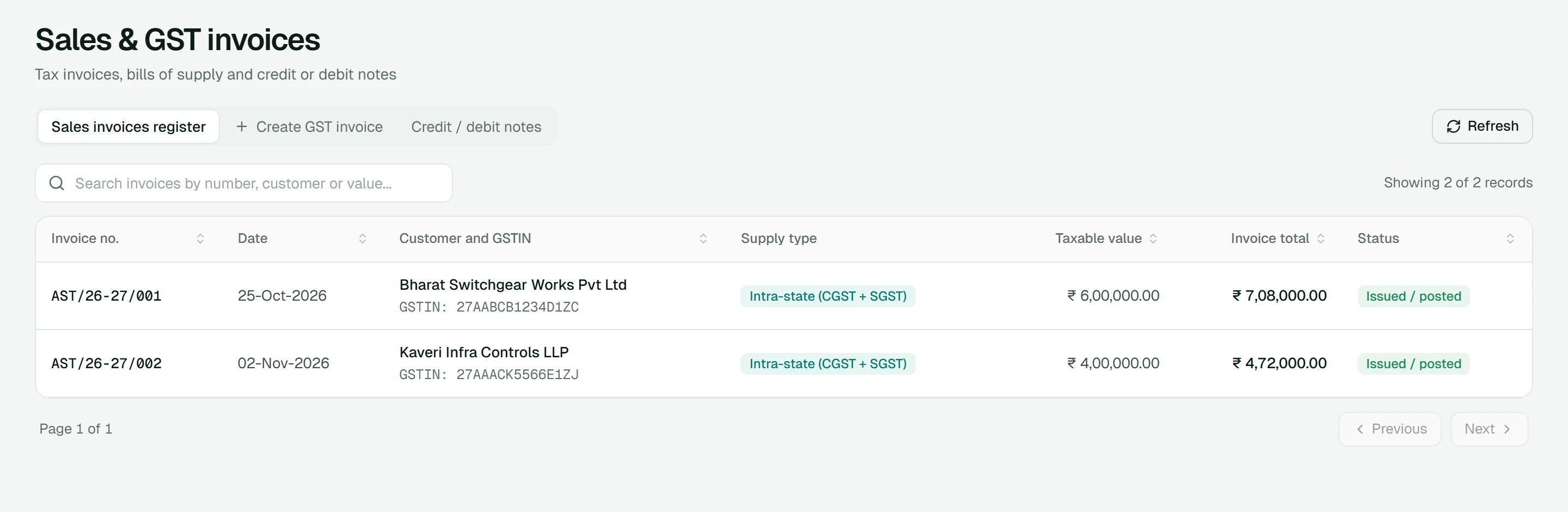
Sales and GST invoice register in the demo, each invoice showing its supply type, intra-state CGST and SGST

The invoice register on the demo's sample books: every invoice carries its supply type.

Input tax credit

Input tax credit, and credit you can't claim

The GST you pay on purchases can usually be set off against the GST you collect on sales. That is input tax credit. Some credit is blocked by section 17(5) of the CGST Act, for example on food and beverages or on goods for personal use, and some is ineligible for other reasons, such as a late claim.

In Deku each purchase bill is marked eligible, blocked under 17(5) or ineligible. Blocked and ineligible credit needs a reason and is added to the cost of the purchase, and GSTR-3B reports each kind in its own table.

Nothing in Deku matches your credit against GSTR-2B yet; it comes from your purchase register, so check it against the portal before you file.

Purchase bill: ITC eligibility

Example: ₹1,00,000 same-state purchase, ₹18,000 GST

The tax goes to the input GST ledgers and is reported as eligible credit in GSTR-3B.

Input CGST and SGST ledgers₹18,000
GSTR-3B 4(A)(5), credit available₹18,000
Reduces the tax you pay by₹18,000

GST Suvidha Provider

Direct filing and e-invoicing go through a licensed GSP.

Deku doesn't file on the government portal with scrapers or shared passwords. Filing, e-invoices and e-way bills go through a GST Suvidha Provider. The connection is built into Deku, but no GSP is connected in this deployment and it hasn't yet been run against a real provider, so those buttons stay disabled and say why.

  1. 1

    Connect your GST portal

    Built, not connected

    Once the server is set up with a licensed GSP, you add your GST portal username in Settings and verify it with an OTP. Your portal password is never asked for.

  2. 2

    E-invoice (IRN)

    Built, not connected

    From an issued invoice, Deku sends the invoice to the GSP and keeps the IRN, acknowledgement number and signed QR code with it.

  3. 3

    E-way bill from the same invoice

    Built, not connected

    Add the vehicle number, transporter ID and distance. The invoice details aren't typed again on another portal.

On an issued invoice

E-invoice and e-way bill

Generate IRN Generate e-way bill

No GST Suvidha Provider is configured on this server.

This is what an issued invoice shows today: the buttons are there, disabled, with the reason beside them. Once a GSP is configured and your portal is connected, the same block shows the IRN, acknowledgement number, signed QR code and e-way bill number.

Your portal username and GSP session are stored encrypted with AES-256-GCM.

Offline JSON availableGSP not connected

Return exports

GSTR-1 and GSTR-3B, prepared from your books

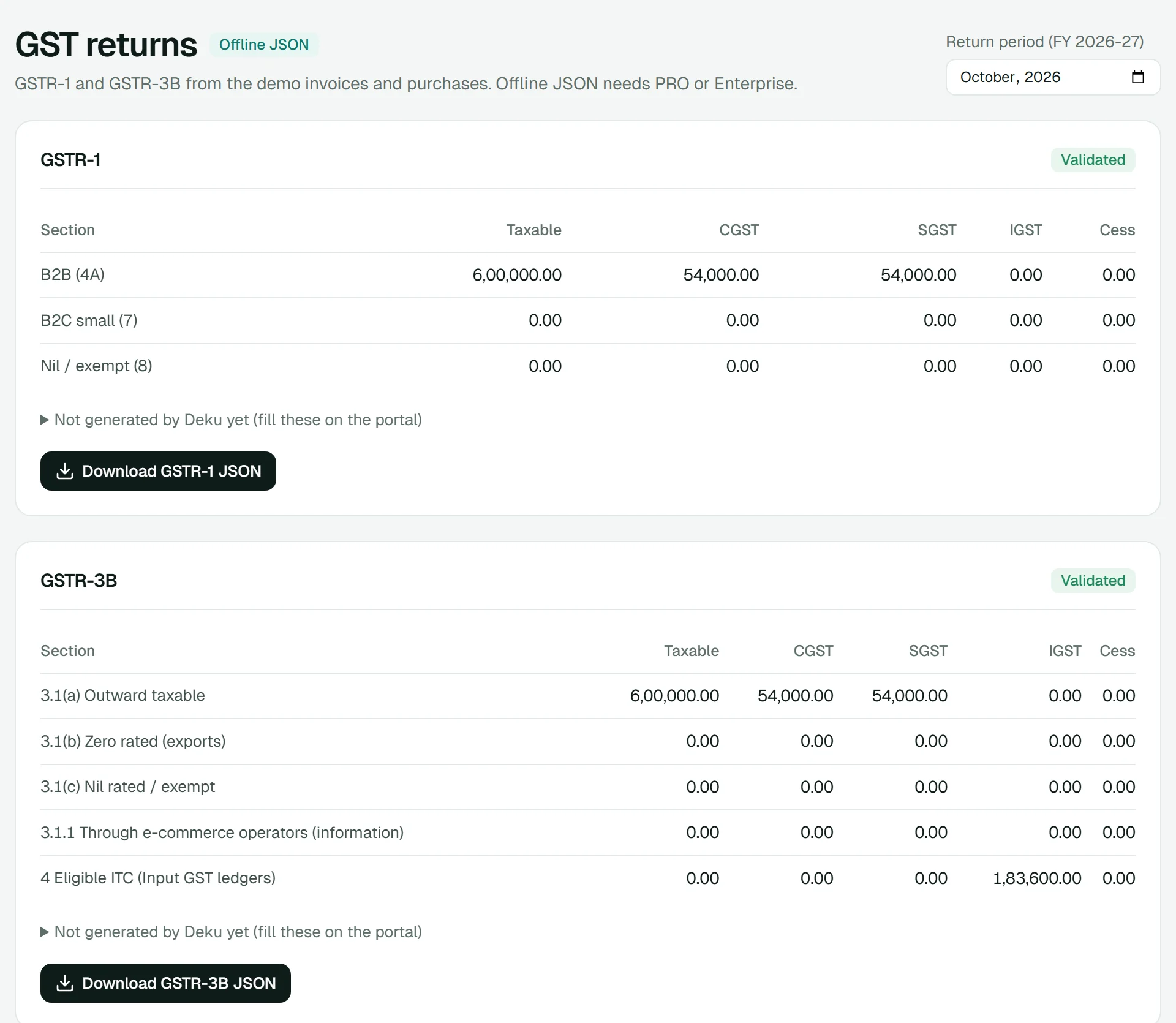
If you file on the GST portal yourself, Deku builds both returns from posted invoices and purchase bills for the month, in the portal's offline JSON format. You review them, download the JSON and upload it.

GSTR-1 and GSTR-3B summaries in Deku for a sample company, each marked validated with a JSON download

GSTR-1

Outward supplies: invoices you issued

Available
  • Table 4: B2B invoices, by the buyer's GSTIN and place of supply
  • Table 7: B2C small supplies, by place of supply and rate
  • Table 8: exempt supplies
  • Table 12: HSN summary, split into B2B and B2C
  • Table 13: documents issued, by invoice series

GSTR-3B

Monthly summary of tax and credit

Available
  • 3.1: outward supplies and the tax on them
  • 3.2: inter-state supplies to unregistered persons
  • 4: input tax credit from posted purchase bills, with 17(5) credit reversed
  • 6: set-off of this period's credit, shown for reference while you pay on the portal
  1. 1

    Period

    Pick the month.

  2. 2

    Readiness

    See anything that blocks the return, with a link to fix it.

  3. 3

    Review

    Check the summary, and what the return doesn't cover yet.

  4. 4

    Download

    Save the JSON and upload it on the GST portal.

Each return also lists what it doesn't cover yet, such as B2C large invoices, amendments, advances and reverse-charge inward supplies, so you know what to add on the portal.

Ready to explore GST invoicing in Deku?

Raise a sample GST invoice, record a purchase bill and find both in the returns, in the demo. No account or login needed.